



Unlock the Full Potential of Microsoft 365 Copilot
Prompting Microsoft 365 Copilot
Revolutionary Features of Microsoft 365 Copilot
Intelligent Task Automation
Seamless Integration
Advanced Data Insights
Enhanced Collaboration
Prompting Microsoft 365 Copilot
A tale of two prompts
Consider two requests fired at the same spreadsheet.
The first: *”analyse the table.”* The second: *”act as a financial analyst; identify the three products with the steepest quarter-on-quarter revenue decline, express the change as a percentage, and append a column with a plausible cause for each.”*
Same tool, same data, radically different outcomes. The first produces a generic summary nobody forwards. The second produces a working analysis with a structure a manager can act on. Microsoft’s own training materials formalise this gap into a four-part discipline — goal, context, expectations and source — which turns a vague wish into what is essentially a technical specification.
This article is a field guide for organisations that have already signed the licence and now need it to pay back. No theory for its own sake: the economics, a role-based playbook, the Excel caveat, and the habit that separates satisfied buyers from disillusioned ones.
Why wording is a financial decision, not a stylistic one
Start with the money. A Forrester Total Economic Impact study commissioned by Microsoft puts average savings at nine hours per user per month, with a 116% three-year return for a large composite organisation. Yet those figures describe organisations whose staff were actually taught to use the tool. The licence itself guarantees nothing.
The research explains why phrasing matters so much. In Microsoft’s PromptWizard project, an optimisation loop achieved best-in-class accuracy using 69 API calls where a competing method required 18,600 — and 24,000 tokens where the rival consumed 1.5 million. Formulation is not decoration; it is compute, latency and salary time. Separately, practitioners note that large language models are acutely sensitive to input format — trivial changes in punctuation or word order can swing output quality noticeably, in ways that sometimes defy intuition about what “clear” means.
An internal prompt library is therefore the cheapest activation lever an organisation owns: no new licences, no infrastructure, no vendor calls.
The specification habit
Treat Copilot as a competent contractor who has joined this morning and knows nothing about your company. You would not tell a contractor “make it nice”. You would brief them: what to produce, for whom, in what format, from which materials.
The four blocks, in briefing language:
- Goal — the deliverable, opened with a verb: draft, compare, extract, rewrite.
- Context — the persona, audience and constraints: “you are a financial controller”; “for a board with two minutes to spare”; “closed deals only”.
- Expectations — format, length, tone: “five bullets, under 150 words, no corporate filler”.
- Source — the raw material: “the current document, pages 3–12”; “this thread plus the last three emails from the client”.
Two refinements complete the habit. First, iterate rather than restart: when an answer is close, add a delta instruction (“same, but grouped by quarter”), because the conversation history is itself context the model uses. Second, close with guardrails: “do not alter the figures”, “keep the terminology from the Definitions section”. Short prohibitions at the end of a prompt measurably reduce rework.
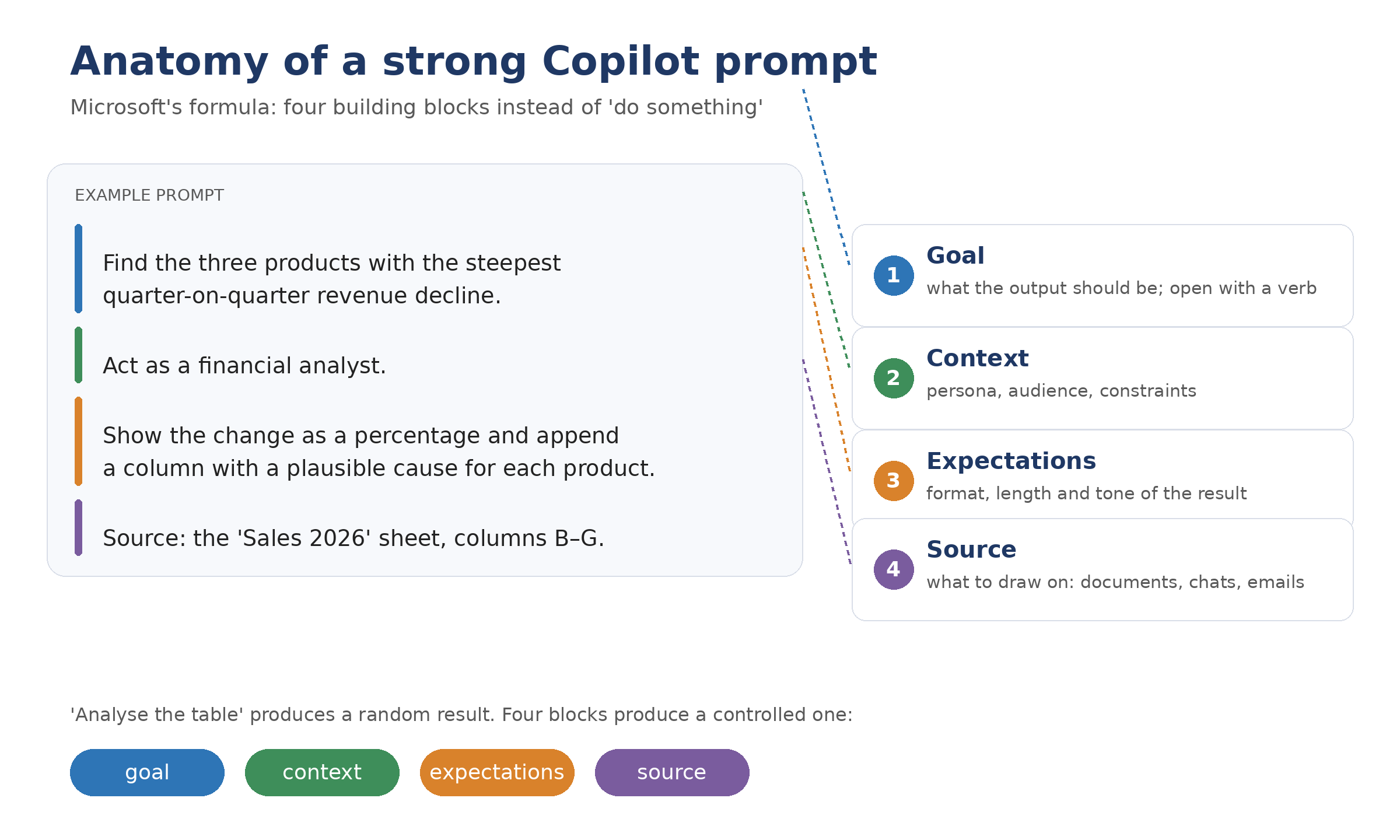
Anatomy of a strong Copilot prompt
A role-based playbook
Applications change; jobs do not. Build your library around roles rather than menus.
Finance
*”Review unread emails from the weekend and sort them into: needs a reply today, can be delegated, can be ignored — one sentence of context per item.”* For analysis: *”flag the three cost centres with the largest unfavourable variance to budget, quantify each in percentage terms, and propose one verification step per item.”* The discipline of finance prompts is quantification and provenance — always ask which cells the figures came from.
Sales
*”Using this thread and the last three emails from the client, prepare a pre-meeting brief: current status, two risks, three questions worth asking.”* Post-call: *”summarise the meeting as decisions, actions with owners and deadlines, and open questions — ignore the second-half budget discussion.”*
HR and people teams
*”Draft a short internal note about moving the performance review cycle by two weeks: confident tone, structure of fact → reason → what changes → next step, under 150 words.”* Then constrain: *”edit for plain language; do not change any dates or figures.”*
Marketing and communications
*”Turn the current document into an eight-slide outline: one idea per slide, minimal text, speaker notes for each. The audience is the executive committee — they want decisions, not detail.”* Copilot structures well; leave the visual polish to a human.
The shared anatomy is unmistakable: persona, audience, structure, limits. Once staff recognise the pattern, they stop asking “what do I ask the AI?” and start recognising tasks.
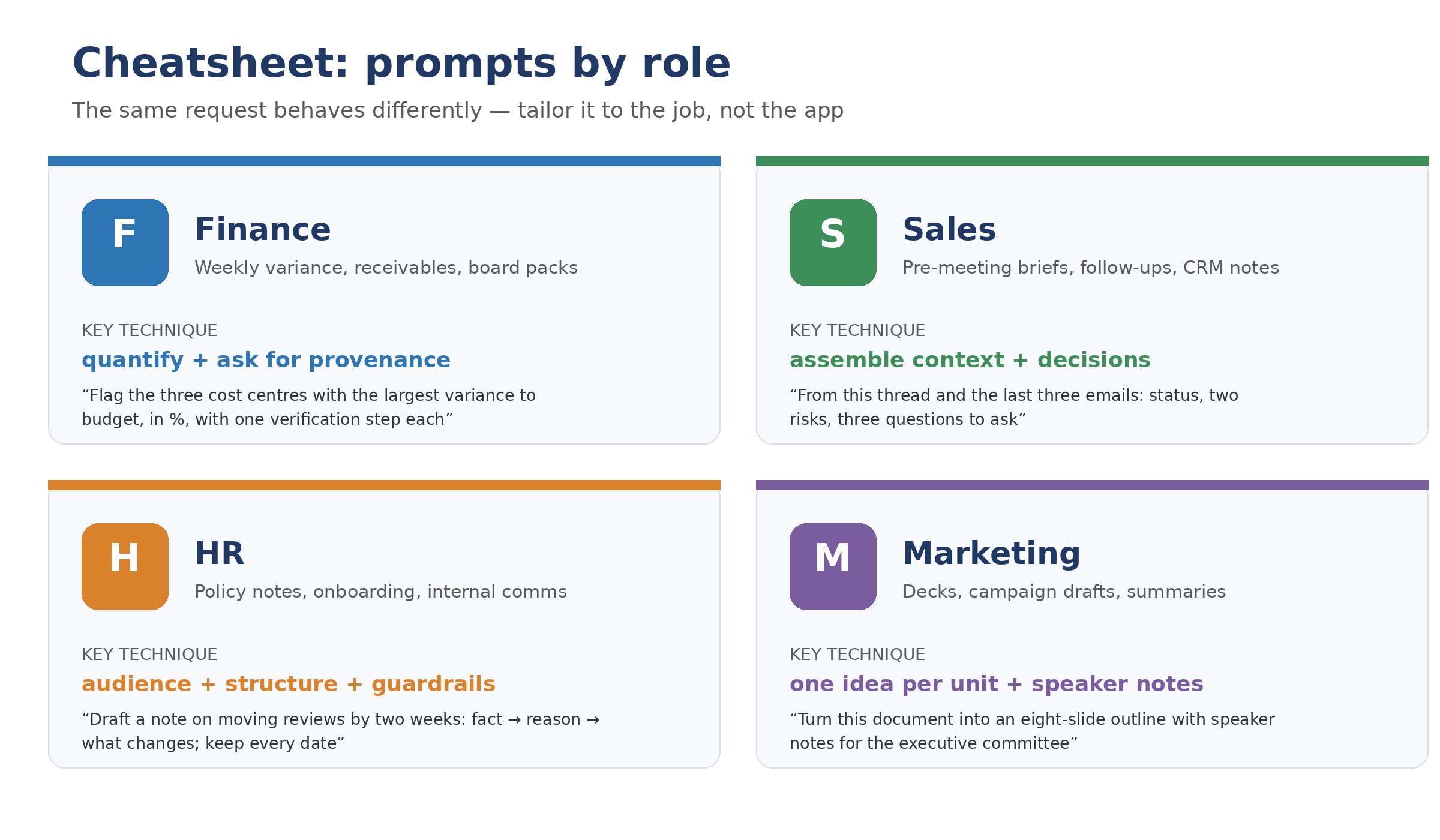
Cheat sheet: prompts by role
The Excel caveat: trust, but verify
Excel deserves its own warning label, because it is simultaneously the most valuable and the most dangerous surface. Copilot now executes Python inside the workbook for statistics, simulation and advanced charts — genuinely powerful. But independent pilots have found it confident with incomplete data, sometimes constructing plausible yet wrong calculations, with hallucinated figures surfacing in a meaningful minority of tasks.
House rule: no Copilot-sourced number enters a report unverified. The ritual prompt — *”show me which cells these values come from”* — should be muscle memory. Use Copilot for scenario modelling and exploration; let controlled spreadsheets produce final numbers.
The second draft is where the value lives
The most common failure pattern is not bad prompting but premature abandonment: one unsatisfactory answer, and the user concludes “AI doesn’t work here”. Practitioners attribute roughly 70% of prompting value to the second and third refinement round. A useful governance rule from early adopters: before dismissing an answer, commit to two follow-up refinements.
Corollary: if four iterations have not moved the output towards the goal, stop polishing and reopen the chat with a rewritten prompt. A long conversation drags stale phrasing into context, and the model begins defending earlier answers instead of serving the task.
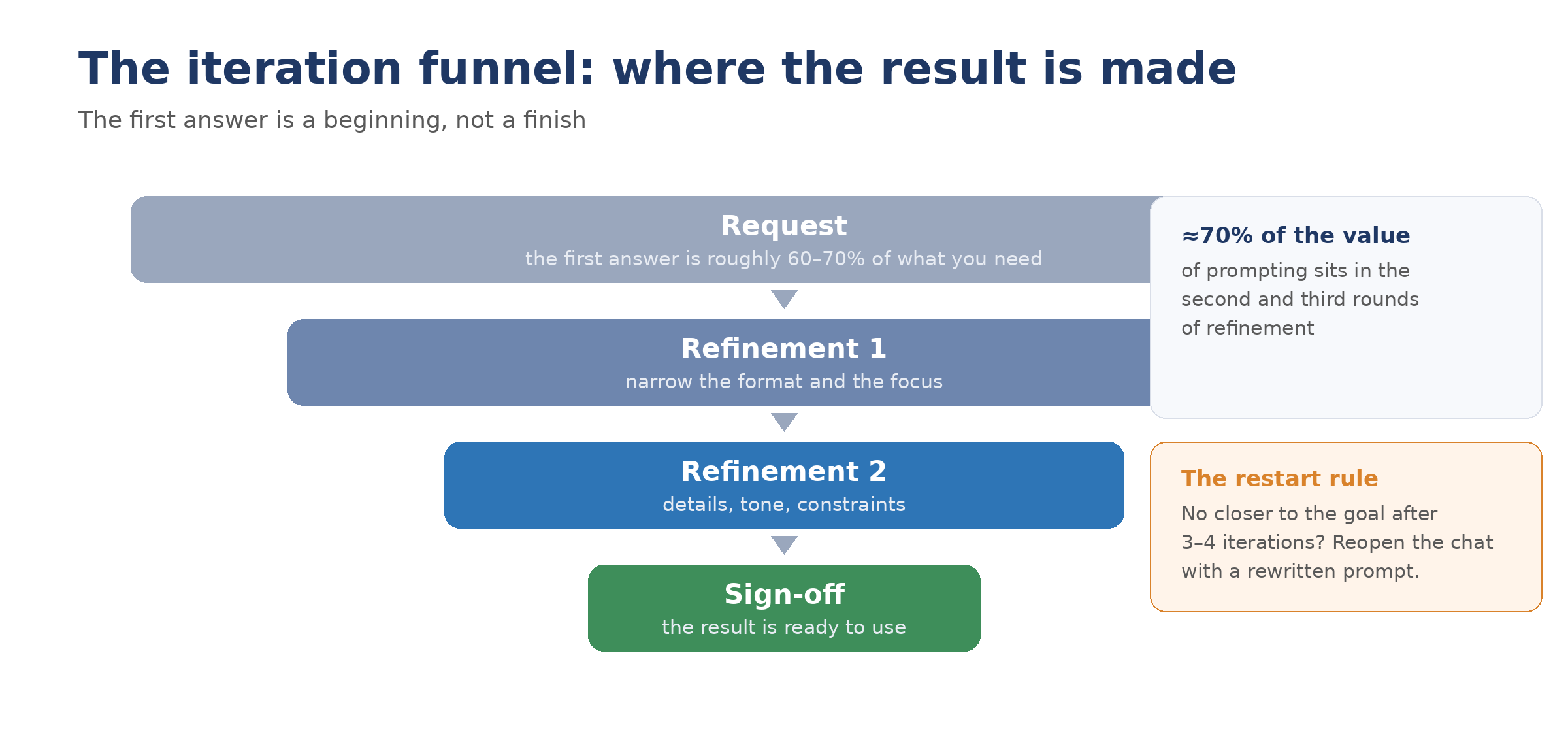
The iteration funnel: where the result is made
From prompts to agents
A well-engineered prompt is a reusable asset, and its natural destination is automation. The same formulations that work in chat become the instruction sets inside Copilot Studio agents — attended or autonomous — that handle invoice approvals, intake triage or recurring research. Microsoft’s Copilot Lab offers a free public collection of prompts and technique breakdowns, and the built-in sample prompts inside each Microsoft 365 app are worth stealing from shamelessly.
The progression is worth stating plainly: individual craft → team library → agent instructions. Organisations that capture the middle stage are the ones that compound their licence spend instead of renting novelty.
Pre-flight checklist: five questions before you scale
- Which roles produce language-heavy work weekly? Equip them first; seat-count generosity is waste.
- What is our definition of “working”? Set activation-rate and first-draft-quality metrics before rollout, not after.
- Where does the source data live, and is it clean? An assistant grounded on chaotic SharePoint returns confident chaos.
- Who owns the prompt library? Unowned libraries die; assign a curator and a review cadence.
- What is our verification ritual for numbers? Decide now, before the first board pack ships with a hallucinated figure.
The bottom line
Copilot does not reward eloquence; it rewards specification. The organisations seeing returns are not the ones with the cleverest model — they are the ones that brief precisely, iterate patiently, verify anything numerical, and treat good prompts as infrastructure rather than improvisation. The formula is four words long: goal, context, expectations, source. The discipline around it is where the nine hours come from.