



Discover the Future of AI Billing
Introducing Microsoft's Copilot Credits
Navigate the complexities of AI billing with ease using Microsoft’s innovative Copilot Credits. Understand your AI usage and costs like never before.
Unveiling Key Features
Transform Your AI Billing Experience
Transparent Usage Tracking
Gain clear insights into your AI consumption with detailed usage metrics.
Cost Efficiency
Optimize your budget with precise billing based on actual AI usage.
Real-Time Monitoring
Stay updated with real-time data on your AI resource consumption.
Scalable Solutions
Adapt your AI resources effortlessly to meet changing demands.
Comprehensive Reports
Access detailed reports that provide a complete overview of your AI expenses.
User-Friendly Interface
Navigate your billing dashboard with ease, thanks to an intuitive design.
Understanding the Copilot Credits Meter
In June 2026 Microsoft stopped giving its agentic AI away. Copilot Cowork, the system built for long-running, multi-step tasks, reached general availability on 16 June 2026 — and with it came a meter. Usage is now billed in Copilot Credits at one US cent each, and from 1 July 2026 tenants that had not configured usage-based billing lost Cowork entirely. For finance directors who grew up on predictable per-seat subscriptions, this is unfamiliar territory. This article explains the meter, the arithmetic behind it, and the questions to put to your reseller before the first invoice arrives.
The shortest honest answer to “what does an AI agent cost?” is: a cent a credit, and the task decides how many credits. A scripted FAQ answer in Copilot Studio burns a single credit; a premium reasoning tool burns a hundred per ten responses. Same currency, two orders of magnitude. Budgeting therefore begins not with the price list but with an audit of what your people will actually delegate.
A two-part invoice
Every Copilot bill now has a fixed layer and a variable layer, and conflating them is the most common budgeting error. The fixed layer is the Microsoft 365 Copilot licence — $30 per user per month — which buys Copilot Chat, the in-app assistant across Word, Excel, PowerPoint, Outlook and Teams, and the Work IQ context engine. Crucially, colleagues holding that licence do not spend credits when they interact with agents inside Microsoft 365 apps.
The variable layer is everything beyond that perimeter: Cowork tasks, custom agents in Copilot Studio serving unlicensed or external users, and calls to the Work IQ API, which also reached GA on 16 June. Microsoft frames the licence as an entry point and the credits as fuel. The fuel gauge sits in the Microsoft 365 admin centre under Copilot → Cost Management, where consumption can be reported per tenant, per group and per individual user.
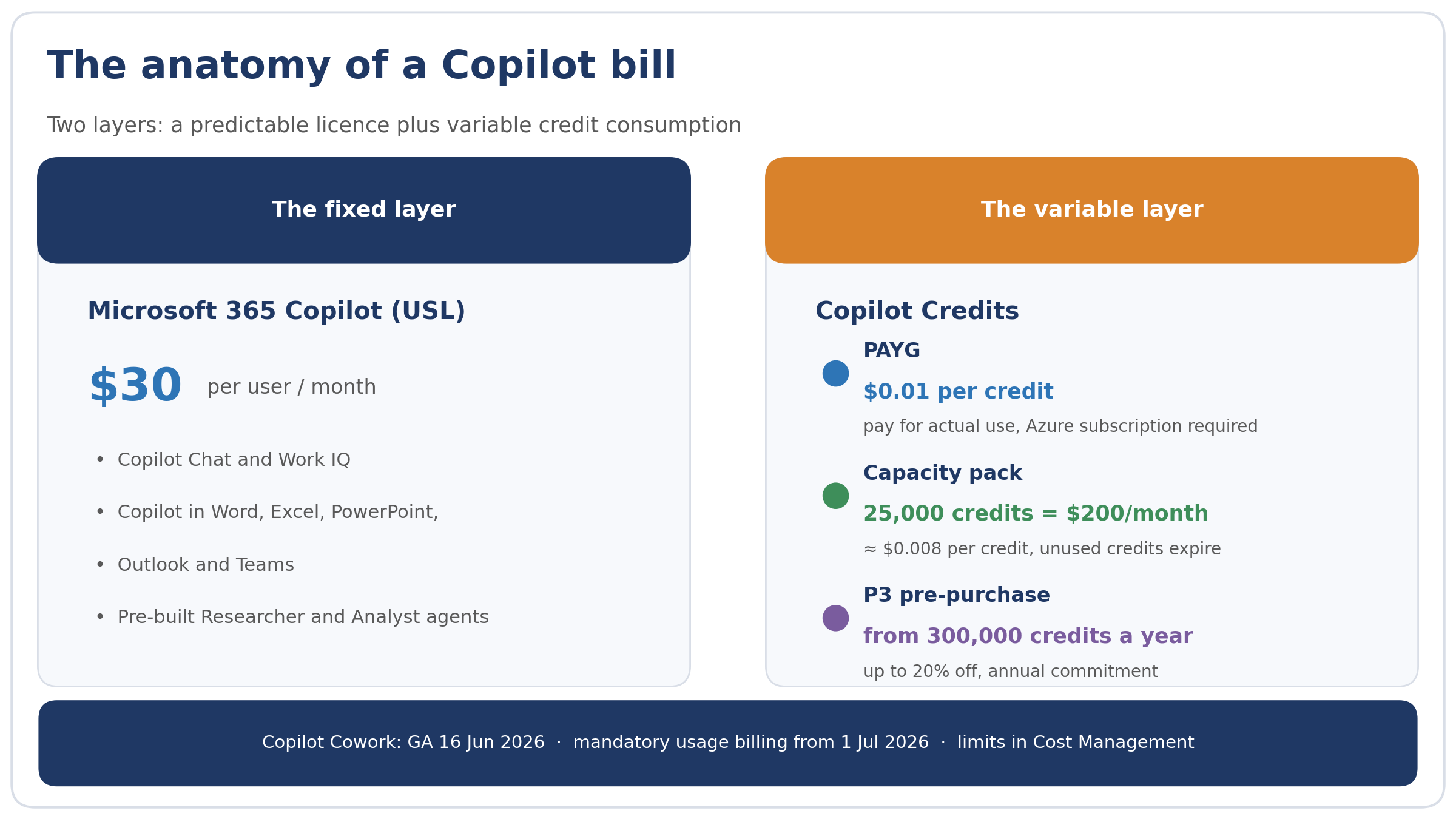
The two layers of a Copilot bill: a fixed licence plus variable credit consumption
Three ways to settle
Microsoft offers three payment mechanics, which differ chiefly in where they place the trade-off between flexibility and discount. Pay-as-you-go bills in arrears at $0.01 per credit through an Azure subscription; it suits pilots and spiky demand. Capacity packs offer 25,000 credits a month for $200 — an effective rate of $0.008, roughly a fifth cheaper — but unused credits expire and, according to analyses of the licensing terms, agents are disabled once consumption passes 125% of the pooled capacity: imagine a customer-facing bot going dark on a Tuesday because another team’s agent raided the shared pool. The third route, the P3 pre-purchase plan, commits an organisation to a volume of Copilot Credit Commit Units for a year, from 300,000 credits upwards, in exchange for a discount of up to 20%, with any overrun falling back to PAYG automatically.
Our suggested sequence for a first-time buyer: PAYG for a quarter, capacity packs for the baseline once the profile stabilises, P3 only when a full year of data justifies the commitment. Regional pricing and channel discounts vary — confirm current figures with your Microsoft partner rather than relying on dollar list prices.
|
Payment route |
List price |
Effective rate |
The catch |
When it fits |
|
Pay-as-you-go |
$0.01 per credit |
$0.01 |
None — but no cap unless you set one |
Pilots and unpredictable workloads; Azure subscription required |
|
Capacity pack |
$200 / month per 25,000 credits |
≈ $0.008 |
Unused credits expire; agents disabled past 125% of pool |
Steady, well-measured baseline consumption |
|
P3 pre-purchase |
Annual commit from 300,000 credits |
Up to 20% off |
Annual commitment; overruns bill at PAYG |
Mature estates with a year of usage data |
What actually moves the needle
Cowork prices each task from four inputs: the model used, the volume of organisational context retrieved, the number of tool calls, and runtime. Microsoft’s own observations from the Frontier preview programme cluster usage into three patterns. Light tasks — a brief synthesis from a handful of sources — run to roughly 100–300 credits ($1–3). Medium tasks, with structured reasoning and two or more outputs, consume around 400–700 credits ($4–7). Heavy tasks — broad aggregation across many sources, deep reasoning, numerous artefacts — start at 700 credits, about $7 a run and climbing.
In Copilot Studio the architecture of the agent sets the burn rate. A classic scripted answer costs one credit; a generative answer two; an agent action five; tenant graph grounding ten; agent flows thirteen per hundred actions. AI tools are metered in bands — one credit per ten basic responses, fifteen for standard, one hundred for premium reasoning models — while content processing costs eight credits a page. These charges stack within a single conversation, which is why an estimate built on a tidy scripted demo so often understates a production workload.
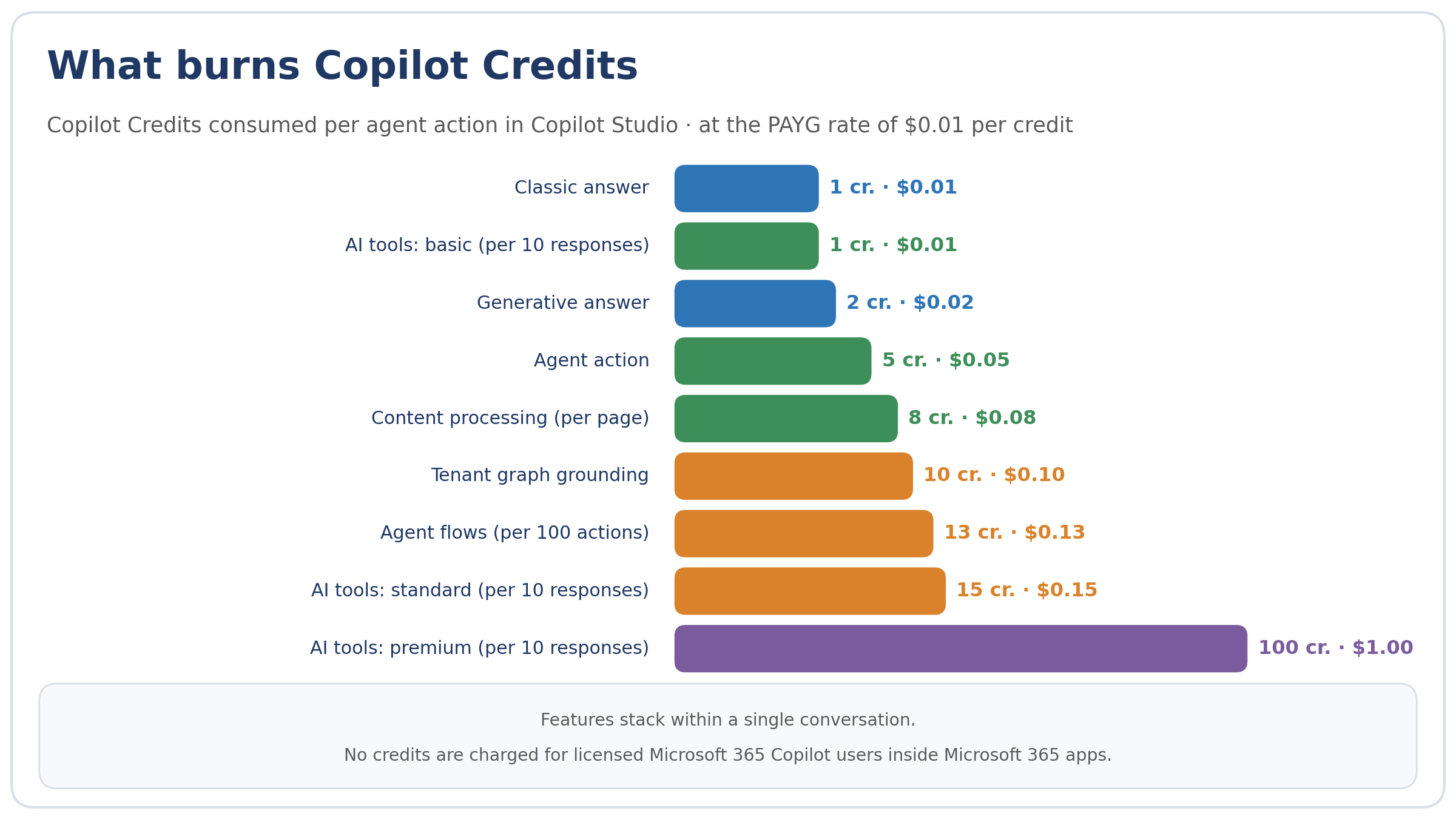
Copilot Credits consumed per agent action in Copilot Studio, from a one-credit classic answer to 100 for premium AI tools
A worked example: a 120-person professional services firm
Consider an illustrative mid-market consultancy — 120 staff, 40 Copilot licences, 25 colleagues running Cowork regularly. Suppose each active user delegates eight light tasks a month (about 180 credits each), three medium ones (about 600 credits), and shares in two heavy team reports (about 900 credits each, split five ways). That averages roughly 3,200 credits per user per month, or 80,000 credits across the practice.
At PAYG rates the variable line is $800 a month; add $1,200 for licences and the total is about $2,000 a month, roughly $24,000 a year. Four capacity packs ($800) cover the baseline with headroom, and a P3 commitment at a 15–20% discount, once a full year’s consumption is on record, would trim a further $1,400–1,900 annually. These are modelled figures for illustration, not a quotation; run your own personas through Microsoft’s Cowork Estimator before committing, and treat the output as a range, not a point.
The procurement playbook
Five questions belong in every conversation with your reseller or Microsoft account team. First: what hard spending caps exist at tenant, group and user level, and who approves overage requests? Second: which models are available per task, and what does model choice do to the unit price — Microsoft’s forthcoming Cowork 1 model is expected to become the cost-efficient default. Third: what happens at pool exhaustion under capacity packs, and is PAYG overflow configured as a safety net? Fourth: how do agent identities map onto your Zero Trust posture — since July 2026, Copilot Studio agents require an Entra Agent ID, which is precisely the hook you need for least-privilege access and conditional access policies. Fifth: what does the renewal arithmetic look like — credits that do not roll over punish overbuying just as surely as PAYG punishes surprise.
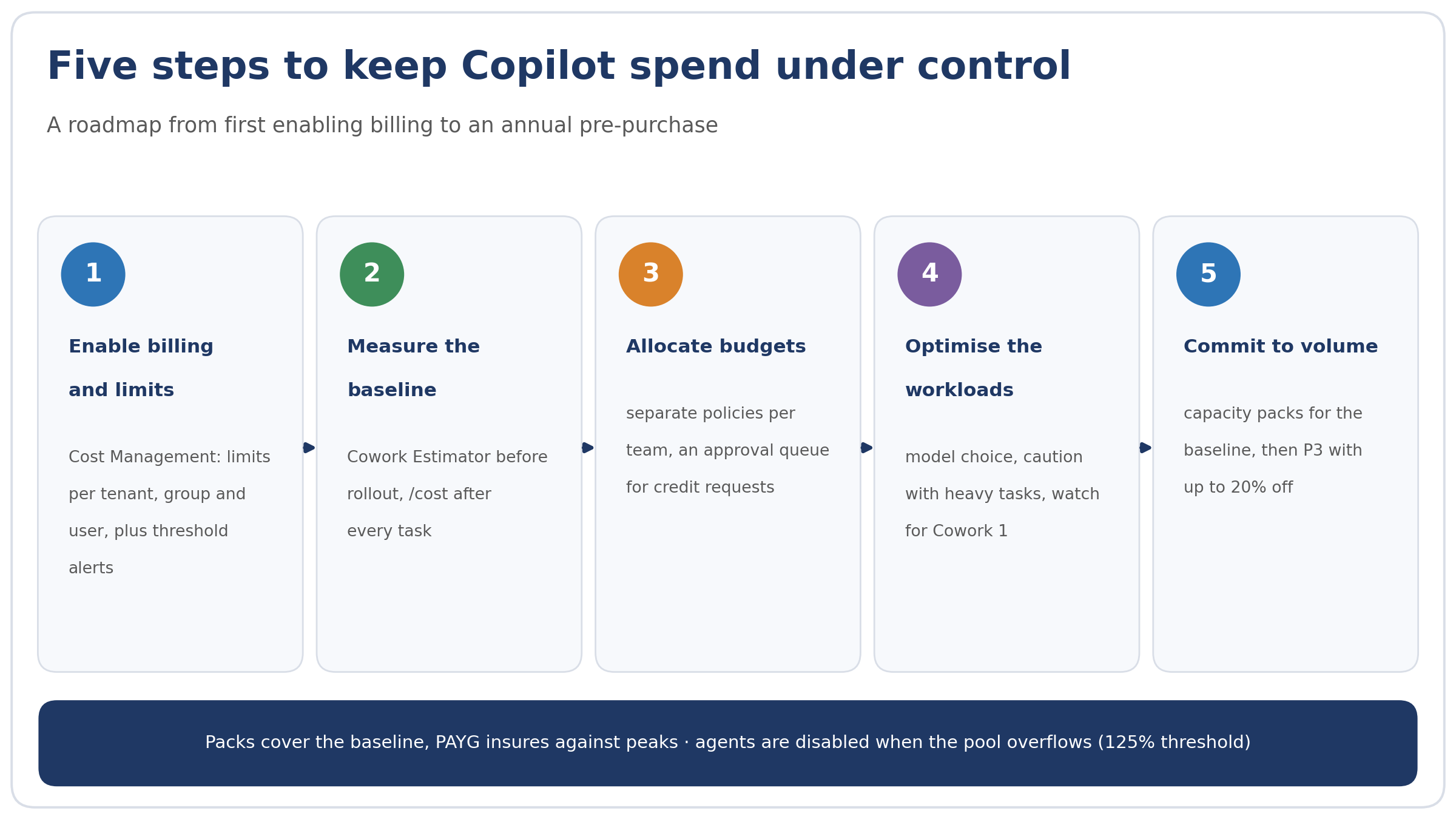
Five steps to keep Copilot spend under control, from limits and baselines to the annual P3 pre-purchase
The wider picture
The annual Work Trend Index 2026, drawing on 20,000 workers across ten countries, charts the behavioural shift that justifies all of this: employees increasingly hand whole chains of work to agents rather than asking for drafting help. Directions on Microsoft reads the model strategy underneath — Microsoft positioning its own models as the cheaper option, with choice of model as the customer’s cost lever. Microsoft additionally claims, from its own testing, that Cowork undercuts equivalent Claude Cowork workloads routed through a Microsoft 365 connector by 30–40%; treat that as a vendor figure until independent benchmarks emerge. The durable lesson for buyers is that consumption pricing rewards governance. Firms that meter early, cap sensibly and commit late will find agents cheap; firms that do none of the three will fund the lesson themselves.
Brief answers to practical questions
Question. Do we need a separate licence for Cowork?
Answer. No — the Microsoft 365 Copilot licence is the entry point; task execution is billed in credits on top.
Question. What happens if we simply do nothing?
Answer. Tenants active in the Frontier preview were switched off on 1 July 2026; everyone else has been paying since 16 June.
Question. Which should we start with — PAYG or P3?
Answer. PAYG, almost always. Commit only once two or three months of usage reports show a stable baseline.
|
Get a realistic forecast Before committing to an annual pre-purchase, ask a Microsoft partner 365 Solutions to model your own workloads: licence audit, credit-consumption forecast, and a payment plan with limits that match how your teams actually work. |
Understanding Copilot Credits and Billing
Explore answers to common questions about managing and understanding your Copilot Credits effectively.
What are Copilot Credits?
Copilot Credits are a form of currency used to measure and manage your usage of Microsoft’s AI-powered Copilot services. They help track your consumption and billing accurately.
How can I monitor my Copilot Credits usage?
You can monitor your Copilot Credits usage through the Microsoft 365 admin center, where detailed reports and dashboards are available to help you keep track of your consumption.
What happens when I run out of Copilot Credits?
If you exhaust your Copilot Credits, additional usage will be billed at the standard rate. It’s important to monitor your usage to avoid unexpected charges.

Explore Copilot Credits Today
Discover how Copilot Credits can streamline your operations and optimize your costs. Contact our support team for personalized assistance or to learn more about our services.
