


Microsoft 365 E7: What’s Inside the Flagship Bundle—and Who Needs It?
Explore how Microsoft’s top-tier productivity, security, and AI offerings fit together, what licensing may require, and whether E7 makes sense for your organization.
Beyond the Standard Enterprise Suite
Microsoft 365 E7: the flagship bundle that assumes you have already decided
On 1 May 2026 Microsoft shipped its first new enterprise tier in a decade. Microsoft 365 E7, branded the Frontier Suite, bundles E5, Copilot, the Entra Suite and Agent 365 for $99 per user per month — against $117 bought separately. The arithmetic is honest. The assumption underneath it is the part worth interrogating before you sign.
E7 is not E5 at a higher price. It is a statement about what Microsoft believes a mature enterprise now looks like: fully licensed for security, committed to Copilot, and beginning to operate AI agents under corporate governance. If that describes your estate, the bundle saves 15%. If it does not, E7 is an elegant way to pay for three products you have not yet justified. The sensible reading of this launch is therefore less about the bundle than about your own readiness — and the questions below are the ones a procurement team should settle first.
A decade in the making, a quarter in the negotiating
Microsoft announced E7 on 9 March 2026 and made it generally available on 1 May — the first new tier since E5 arrived in December 2015. It sells through the usual channels: Enterprise Agreement, EA Subscription, MCA-Enterprise and CSP, in variants with and without Teams for European compliance. Two pricing facts frame any negotiation. First, E7 escaped the 1 July 2026 increases that pushed E3 to $39 and E5 to $60 — the one large SKU in the portfolio whose list price is stable this year. Second, the CSP promotion that offered 10% off from ten seats and 15% from one hundred closed on 30 September 2026; write-ups still promising that discount are describing a door that has shut.
Context matters here. Microsoft removed EA volume discounts in November 2025, weakening the old lever of buying big to save big. The E7 promotion was the replacement lever — and its withdrawal is telling. Microsoft no longer needs to discount the bundle to sell the concept; it needs you to arrive already persuaded. That shifts negotiating weight back to architecture: how you mix tiers, how you re-harvest licences when roles change, and how well you can evidence usage. Partners report that estates with clean ITAM data negotiate meaningfully better terms than estates arguing from slide decks.
What the bundle actually contains
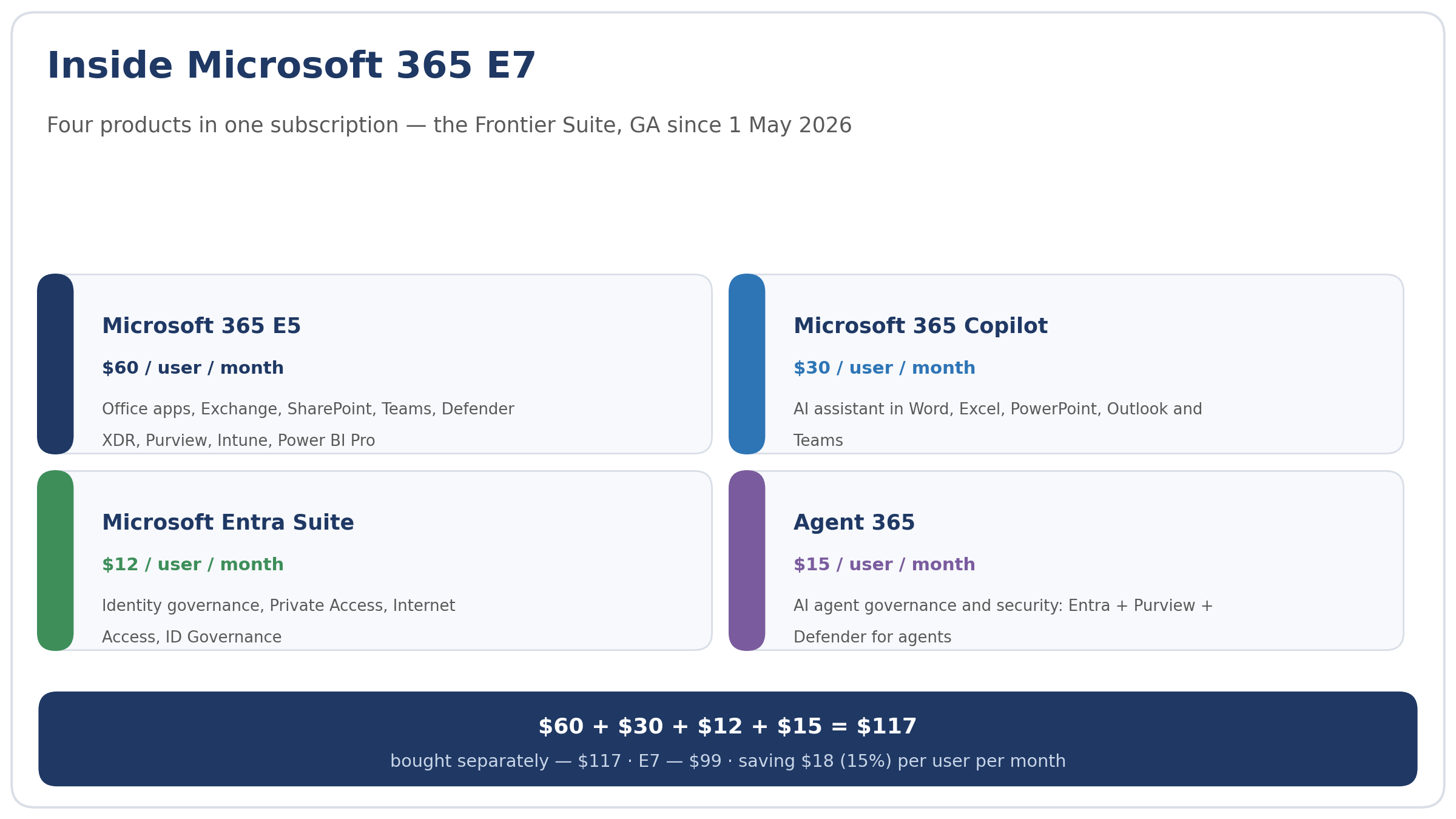
Four products, one invoice. Microsoft 365 E5 supplies the office applications, Exchange, SharePoint, Teams and the security stack — Defender XDR, Purview, Intune, Entra ID P2 and Power BI Pro. Microsoft 365 Copilot adds the assistant across Word, Excel, PowerPoint, Outlook and Teams, with Copilot Chat and the Work IQ context layer. The Entra Suite contributes identity governance, Private Access and Internet Access. And Agent 365 — itself GA on 1 May — supplies the control plane for AI agents: identities in Entra, Purview and Defender policies inherited, shadow agents discovered on Windows devices. That last component deserves emphasis, because it is the least understood: Agent 365 governs agents; it does not build them and it does not pay for their compute.
Fig. 1. The E7 bundle: E5, Copilot, Entra Suite and Agent 365 — $117 bought separately, $99 as a bundle
Inside Microsoft 365 E7
The four sums every CFO will ask for
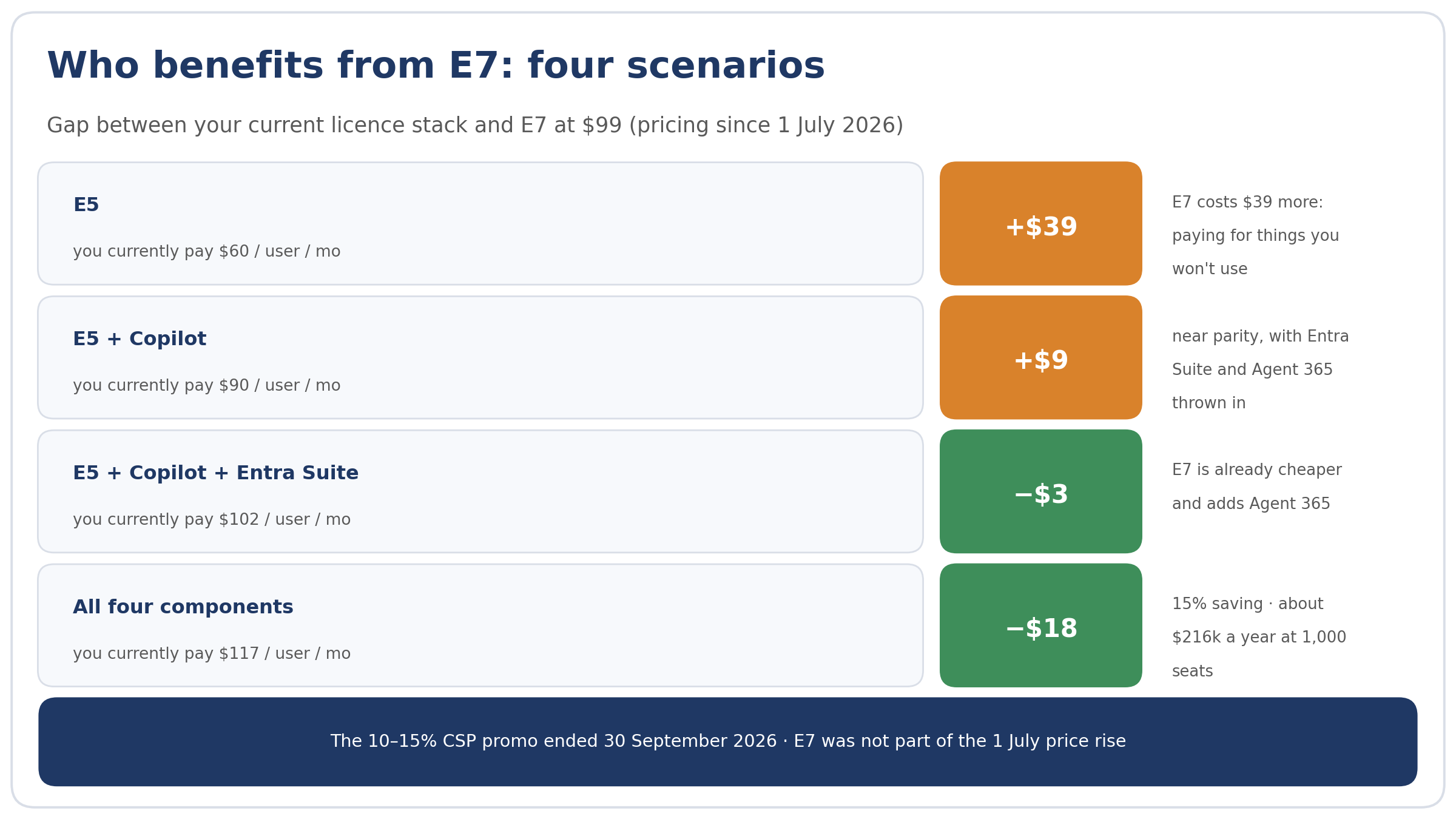
The bundle’s value depends entirely on the starting point, and there are exactly four cases. An E5-only estate at $60 pays $39 more per user for E7 — indefensible without a funded Copilot plan. An E5-plus-Copilot estate at $90 pays $9 more and receives Entra Suite and Agent 365, effectively two products for the price of a sandwich; most committed Copilot shops pass through this point of near-parity. An estate already at E5, Copilot and Entra Suite pays $102 separately and $99 in the bundle — E7 is cheaper and adds Agent 365. And the full four-product stack at $117 saves $18 per user, or 15%; at a thousand seats that is roughly $216,000 a year at list prices. Note the direction of travel: E7 rewards those who have already bought nearly everything. It is a consolidation discount, not an adoption incentive.
Fig. 2. Four scenarios for E7 economics: from $39 more expensive for E5-only estates to an 18-dollar saving with the full stack
Who benefits from E7: four scenarios
The lines E7 does not cover
Three budget lines sit outside the $99. Agent compute is the first: Copilot Studio, Microsoft Foundry and Work IQ API calls are metered in Copilot Credits through Azure, so every agent you deploy spends money the bundle does not contain. The second is the frontier agent tier: Copilot Cowork remains a Frontier programme with usage billing, and Scout is experimental; neither is inside E7. The third is Security Copilot, which Microsoft is rolling into E5 and E7 tenants in a metered model — 400 SCUs a month per thousand users — and sustained use will outrun that allowance quickly. A defensible TCO model for E7 therefore reads like a cloud bill: a fixed platform line at $99, plus a measured consumption line for agents and security AI, plus a growth reserve. Estimating that reserve from a pilot cohort’s telemetry is far safer than extrapolating from Microsoft’s launch materials.
What Microsoft gains — and why that matters to you
It is worth stating the vendor’s interest plainly, because it explains the packaging. Microsoft has spent three years proving that Copilot sells; it has spent the last year proving that customers renew it. Bundling Copilot into a tier that also contains the security stack converts a discretionary AI experiment into infrastructure spend — the budget line that survives cost reviews. None of this makes E7 a poor deal; it makes it a deal to be examined on your numbers rather than Microsoft’s narrative. The healthy posture in a renewal conversation is symmetrical: Microsoft consolidates its revenue, you consolidate your discounts, and the audit trail of actual usage is the currency both sides trade in.
There is also a timing consideration. Organisations that restructured their Microsoft agreements after the November 2025 EA changes generally report less flexibility than those still mid-term, because the new commercial constructs reward commitment to suites rather than to volumes. If your EA matures within the next eighteen months, the E7 decision belongs in that negotiation as a structural question — bundle architecture, role mapping, renewal caps — rather than as a mid-term purchase, where the leverage is thinner and the margin for renegotiation smaller.
Mixed estates: the unglamorous answer that works
Consider an illustrative firm of 800 staff on E5, of whom 250 use Copilot intensively — executives, analysts, the sales floor. Licensing everyone into E7 costs $950,400 a year. Licensing the 250 into E7 and leaving 550 on E5 costs $693,000. The difference, some $257,400 annually, buys exactly nothing in capability terms except unused subscriptions. The research supports caution: Flexera’s State of ITAM 2026 reports that 59% of organisations see wasted AI software spend rising, while only 31% have full visibility into who uses what, and a mere 29% measure value. The same study’s discipline — usage telemetry, role-based triggers, six-monthly reviews — routinely saves more than any promotion ever did.
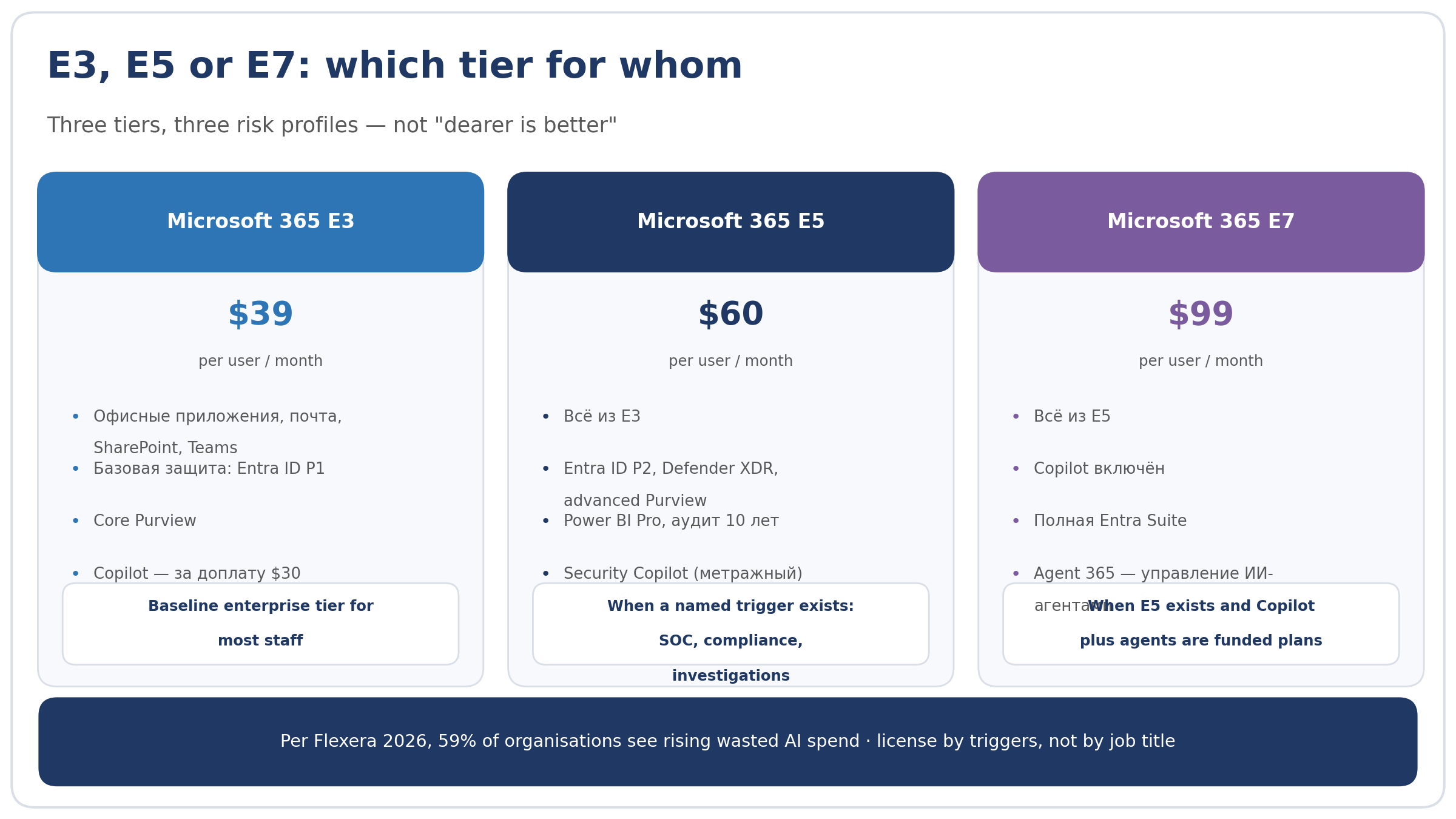
The practical rule is to license by trigger, not by seniority. E5 where a named security or compliance need exists; E7 where E5 already sits and Copilot plus agents appear in funded plans; E3 for the long tail whose work is documents, email and Teams. The failure mode to avoid is not under-licensing — it is the ceremonial upgrade of whole departments because the bundle is the flagship. A two-week telemetry baseline before any decision will almost always embarrass the org chart and vindicate the accountants.
Fig. 3. E3, E5 and E7: three tiers, three risk profiles — choosing by trigger rather than job title
Microsoft 365 E3, E5 or E7: which tier for whom
Three questions, briefly
Question. Is E7 a replacement for E5?
Answer. No. E5 continues at $60 alongside it. E7 is a separate, higher tier; Microsoft positions them as adjacent levels of maturity rather than old and new.
Question. Can we license E7 for part of the workforce?
Answer. Yes — and it is the recommended pattern. Per-user licensing lets you assign E7 to Copilot-heavy roles while others remain on E5 or E3, which is the standard defence against paying for idle AI seats.
Question. Does E7 include agent compute?
Answer. No. Agent 365 governs agents; their consumption in Copilot Studio, Foundry and Work IQ APIs bills separately in Copilot Credits via Azure. The bundle buys control of agents, not their labour.
|
Negotiate with your own numbers A Microsoft partner 365 Solutions can run the usage audit, build the E3/E5/E7 role map and model the three-year TCO — so the bundle is bought because the arithmetic works, not because the brochure is persuasive. |
Explore the Capabilities Behind E7
Everyday Productivity
Bring together familiar Microsoft 365 apps and collaboration tools, including Word, Excel, Outlook, Teams, and SharePoint, where included in your plan and region.
Identity and Device Protection
Strengthen access and endpoint management with eligible Microsoft Entra and Intune capabilities; specific protections depend on your licensing and configuration.
Threat Defense and Compliance
Evaluate advanced Microsoft Defender and Purview tools for detecting threats, protecting information, and supporting governance, subject to included entitlements and setup.
AI-Powered Workflows
Explore Microsoft 365 Copilot and other AI capabilities where licensed and available; data permissions, tenant readiness, and configuration shape what users can access.
Microsoft 365 E7 vs. E5: Which Fits?
Microsoft 365 E7
Consider the flagship bundle if your organization needs its advanced AI, security, and management capabilities across a broad user base. Confirm the published feature list before purchase.
Designed for broad AI adoption
Advanced security focus
Unified enterprise licensing
Best for complex requirements
Microsoft 365 E5
A strong fit for organizations that need enterprise productivity, security, and compliance without committing to every capability in the flagship bundle.
Core enterprise apps included
Established security capabilities
Compliance tools for regulated teams
Best when E7 extras are unnecessary
Who Should Consider E7?
Enterprises scaling AI across departments
Security teams managing complex threats
Organizations with extensive compliance needs
IT teams consolidating overlapping licenses
Global workforces with varied access needs
Leaders seeking centralized governance
Teams piloting advanced AI workflows
Businesses standardizing enterprise tools
Regulated firms evaluating stronger controls
Operations teams reducing license sprawl
Small teams with basic productivity needs
Businesses already well served by E5
Users who rarely need advanced features
Organizations with limited AI readiness
Teams prioritizing the lowest upfront cost
Workloads covered by existing add-ons
Short-term projects needing fewer tools
Departments better suited to mixed plans
How to Evaluate and Roll Out E7
Step 1
Step 2
Step 3
Microsoft 365 E7: Common Questions
Explore licensing, eligibility, included services, migration, and how to confirm what your organization uses today.
Is Microsoft 365 E7 available to purchase now?
Confirm current availability and official licensing terms before placing an order. Contact 365Solutions to check whether E7 is offered for your organization and review suitable alternatives if it is not.
Who is Microsoft 365 E7 designed for?
E7 may suit organizations seeking a higher-tier combination of productivity, security, compliance, and AI capabilities. The right fit depends on your requirements, existing licenses, and the services included in the official offer.
What services are included with an E7 license?
Included services depend on Microsoft’s published E7 plan details and your purchasing agreement. Request the current service description and compare it with your needs before assuming a specific app, security feature, or Copilot capability is included.
Does E7 include Microsoft 365 Copilot?
Do not assume Copilot is included. Check the current E7 service description and licensing terms to see whether it is bundled, requires an add-on, or has separate eligibility requirements.
Can every organization buy E7?
Eligibility can vary by region, customer type, purchasing channel, and applicable Microsoft terms. 365Solutions can help verify your options against your organization’s circumstances.
Can we move from E3 or E5 to E7?
If E7 is available to your organization, you may be able to change plans or assign new licenses. Review contract commitments, feature dependencies, and user assignments first to avoid unexpected costs or service changes.
Will migrating to E7 affect our data or users?
A license change does not necessarily require moving your data, but feature availability and user access can change. Plan the transition, test key workflows, and keep required licenses assigned throughout the changeover.
How can I check our current Microsoft 365 plan?
An administrator can review subscriptions and assigned licenses in the Microsoft 365 admin center under Billing and Users. Compare those entries with your agreement to confirm your plan, renewal terms, and add-ons.
How do we confirm an E7 quote is legitimate?
Ask for the exact Microsoft product name, included services, license term, purchasing channel, and billing details. 365Solutions can help you compare an official license with your requirements before you buy.
Find the Right Microsoft License With Confidence
Talk to 365Solutions about E7 availability and the best fit for your team. Get an authentic Microsoft license at a competitive price, with 24/7 support whenever you need help.